One-line hook: Turn your face, expressions, and personality into a fun digital character you can share with friends.
Introduction
Have you ever wanted to send a message that looks a little more like you? Instead of choosing a regular smiley, you could share a cartoon character based on your appearance, complete with your hairstyle, clothes, and expressions. That’s the idea behind Samsung AR Emoji.
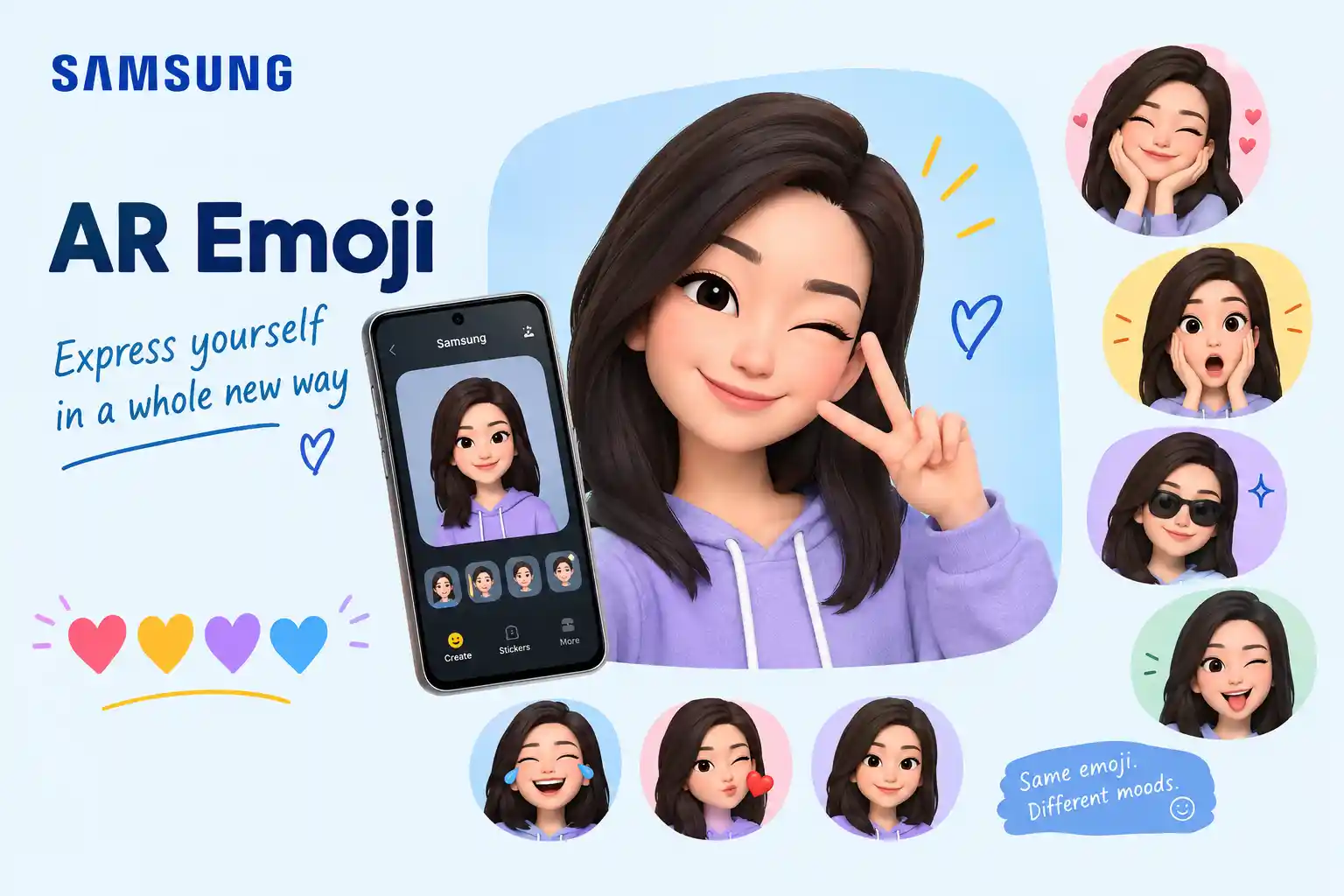
Samsung AR Emoji is a personalized avatar feature available on supported Galaxy devices. It lets you create a digital character, make expressive stickers, and, on compatible models, capture photos or videos featuring your character. It’s useful for playful conversations, creative social posts, and messages that feel more personal than ordinary text. 😊
There is one important detail for 2026: Samsung has renamed the feature Galaxy Avatar on compatible devices running Android 15 and One UI 7.0 or later. Older devices and software versions may still display the AR Emoji name.

Samsung dk
+1
Whether you’re trying to find the feature, create your first avatar, or share personalized stickers on WhatsApp, this guide explains how it works and what to expect.
Your own digital character can make an everyday message feel more expressive, personal, and fun. ✨
5. What Does Samsung AR Emoji Mean?
Samsung AR Emoji refers to a personalized digital character that represents you through a cartoon-style appearance, facial expressions, and, on supported devices, animated movements. Unlike a standard emoji such as 😀, which is a predefined symbol, an AR Emoji is a character you can customize and use to express yourself.
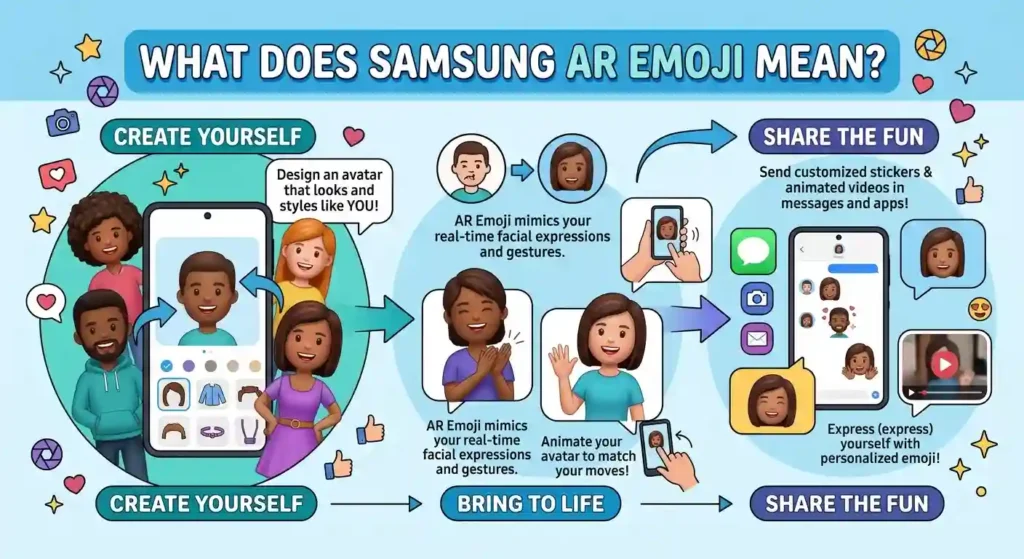
The letters AR stand for augmented reality. In this context, the technology allows a digital character to appear in camera experiences or imitate selected expressions and movements. Samsung’s newer Galaxy Avatar feature continues this idea on compatible devices.

Samsung dk
+1
Its basic and emotional meaning
The feature is mainly about personal expression, creativity, and playful communication. You can design a character that resembles you or create a look that reflects your personality.
Different expressions can communicate different moods:
- 😀 A cheerful avatar can celebrate good news or greet a friend.
- 😊 A gentle smile can make a message feel friendly and reassuring.
- 😎 A confident expression can suit a playful announcement or a cool selfie.
- 😂 A laughing expression can react to a funny story or inside joke.
- 🥰 A warm expression can add affection to a personal message.
- 😢 A sad expression can show disappointment or offer a sympathetic reaction.
These are examples of the ordinary emoji symbols that can complement an avatar, not a claim that every symbol is built into every AR Emoji sticker pack.
What does it mean in texting?
When someone sends a personalized character, they may be sharing their mood, making a joke, or simply adding personality to the conversation. A familiar avatar can also make a greeting feel more personal than plain text.
For example, a friend might send a smiling character with “Finally finished my exams!” The character adds excitement, but the words still explain the situation.
What does it mean on social media?
On Instagram, TikTok, and Facebook, an avatar image or sticker can make a reaction more distinctive. Creators may use one in a story, a casual post, or a short video.
Still, context matters. A laughing character could signal genuine amusement or playful sarcasm. A heart-themed expression could show friendship or romance, depending on the relationship.
The key point: Samsung AR Emoji is a creative communication tool, not one specific emotion. Its meaning comes from the character, expression, accompanying words, and situation.
6. Samsung AR Emoji and Related Emoji Meanings
The following standard emoji symbols can complement your personalized avatar in messages and captions. They are ordinary emoji characters, not ten separate Samsung AR Emoji features.
| Emoji | Core meaning | Possible misread | Best used when |
| 😀 | Happiness and excitement | Forced cheerfulness | Sharing good news |
| 😊 | Warmth and friendliness | Shyness or politeness | Sending a kind reply |
| 😎 | Confidence and a relaxed mood | Showing off | Celebrating an achievement |
| 😂 | Strong amusement | Laughing at someone | Reacting to a funny moment |
| 🥰 | Affection and warmth | Romantic interest | Expressing fondness |
| 😢 | Sadness or sympathy | Overstated disappointment | Responding to a difficult day |
| 😮 | Surprise or amazement | Shock or disbelief | Reacting to unexpected news |
| 😴 | Sleepiness or tiredness | Boredom | Saying good night |
| ✨ | Celebration or a special touch | Pure decoration | Highlighting a memorable moment |
| ❤️ | Love, care, or appreciation | Romantic interest | Showing affection |
| 📱 | Phones and digital communication | A literal device reference | Discussing mobile features |
| 💬 | Conversation or messaging | A general chat reference | Introducing a message |
7. Ten Emoji Cards for Everyday Avatar Conversations
1. 😀 Grinning Face
Meaning: Happiness, excitement, and an upbeat mood.
Example 1: I finally got the job I wanted! 😀
Example 2: Today’s going to be a good day 😀
2. 😊 Smiling Face
Meaning: Warmth, kindness, and a friendly response.
Example 1: Thanks for helping me with that 😊
Example 2: It was lovely talking to you 😊
3. 😎 Smiling Face with Sunglasses
Meaning: Confidence, a relaxed attitude, or playful coolness.
Example 1: Project finished before the deadline 😎
Example 2: New profile picture is ready 😎
4. 😂 Face with Tears of Joy
Meaning: Strong amusement or laughter.
Example 1: That story gets funnier every time 😂
Example 2: I can’t believe you actually did that 😂
5. 🥰 Smiling Face with Hearts
Meaning: Affection, appreciation, and a warm emotional response.
Example 1: You remembered my favorite song 🥰
Example 2: This little surprise made my day 🥰
6. 😢 Crying Face
Meaning: Sadness, disappointment, or sympathy.
Example 1: I really wanted to attend the party 😢
Example 2: Sorry you’re having such a difficult day 😢
7. 😮 Face with Open Mouth
Meaning: Surprise, amazement, or disbelief.
Example 1: You finished the whole book already? 😮
Example 2: I wasn’t expecting that announcement 😮
8. 😴 Sleeping Face
Meaning: Sleepiness, tiredness, or a wish to rest.
Example 1: I’m heading to bed now 😴
Example 2: That was a long day at work 😴
9. ✨ Sparkles
Meaning: A special touch, excitement, or a celebratory feeling.
Example 1: Finally decorating my new room ✨
Example 2: A little update to my profile ✨
10. ❤️ Red Heart
Meaning: Love, care, appreciation, or emotional closeness.
Example 1: Thanks for always supporting me ❤️
Example 2: Sending you lots of love today ❤️
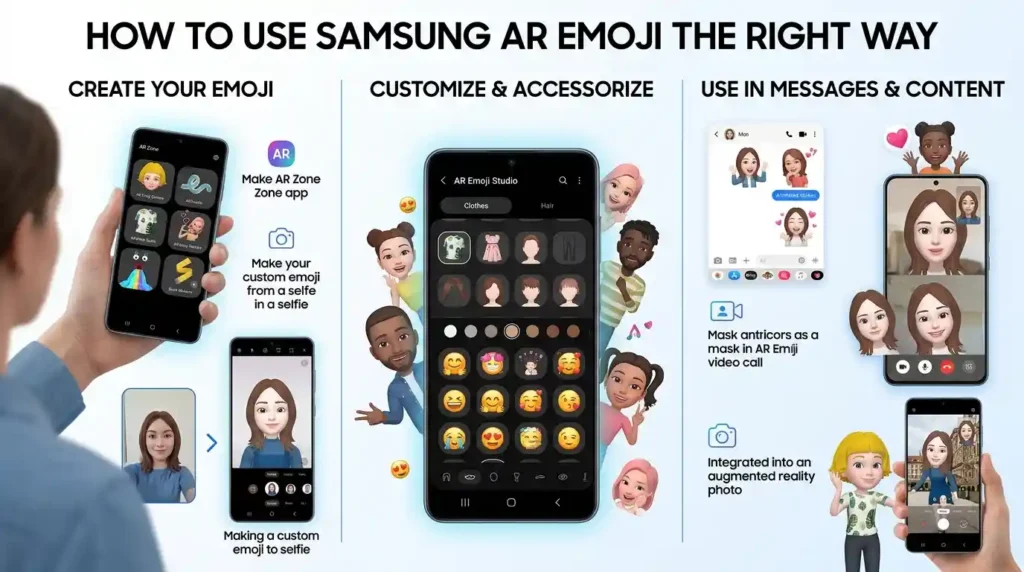
8. How to Use Samsung AR Emoji the Right Way
The best way to use Samsung AR Emoji is to choose a character or sticker that fits the conversation. You do not need to create a complicated message. A single personalized reaction can be enough.
WhatsApp 💬
WhatsApp is useful for sharing avatar stickers in everyday conversations, provided your device and keyboard offer a compatible sharing option.
- Personal chats: Send a smiling avatar to greet a friend.
- Family conversations: Share a cheerful sticker after receiving good news.
- Friendships: Use a funny expression to react to an inside joke.
- Emotional messages: Pair a gentle avatar with a sincere message of support.
- Status updates: Share a saved avatar image or video when you want a more personal post.
For example: “Finally home after a busy day 😊”
Remember that Samsung’s personalized avatar sharing may depend on the keyboard and device. If the sticker is not available directly inside WhatsApp, you may be able to share a compatible saved image instead.
Instagram 📱
Instagram works well for creative visual expression. You can use a saved avatar image in a story, add it to a suitable design, or include a compatible image in a post.
- Captions: Add an avatar image to a personal update.
- Comments: Use a supported sticker or image when replying.
- Bios: Choose an avatar as a profile image if it fits your style.
- Reels: Incorporate saved avatar media into a video-editing workflow.
For example, a creator could share a cartoon-style self-portrait with the caption, “A little change of style ✨”
Do not assume every Samsung sticker can be inserted directly into every Instagram text field. Sharing support varies by format and app.
TikTok 🎵
TikTok is suited to playful, expressive content. You could use an avatar in a video, create a humorous reaction clip, or combine a saved character image with a short edit.
For example, a video about finishing a difficult assignment could feature a confident character and a caption such as “Finally done 😎”
If the avatar is saved as a still image, it will not automatically behave like an animated character. The available result depends on the original media and the editing tools you use.
Facebook offers several ways to share compatible avatar media. Add a saved image to a post, use a supported sticker in a conversation, or share a short video when your device provides one.
For instance, a cheerful character can accompany a birthday greeting or a congratulatory comment. In Messenger, check the available sticker options in the conversation rather than assuming your entire Samsung avatar collection will appear there.
The practical rule is simple: create your avatar on your Galaxy device, then choose the sharing method supported by the destination app.
9. Do’s and Don’ts of Samsung AR Emoji
A personalized avatar can make conversations more entertaining, but thoughtful use keeps it from becoming distracting.
Do
- Use an avatar that reflects your personality or the mood you want to share.
- Consider the person receiving your sticker before sending an affectionate expression.
- Match the character’s expression to the message.
- Preview saved stickers and videos before posting them.
- Check how your avatar appears after sharing it through another app.
Don’t
- Send animated reactions randomly in a serious conversation.
- Assume every friend will interpret the same expression in the same way.
- Fill every message with stickers when a few words would be clearer.
- Expect all Samsung models to offer identical avatar tools.
- Assume an avatar sticker will transfer as an editable character to another phone.
For example, a smiling avatar can suit a casual greeting, but a sincere written response is more appropriate when a friend shares upsetting news. A playful character should support your message, not replace the empathy the situation needs.
10. Why Does Samsung AR Emoji Look Different on iPhone and Android?
If you share a Samsung AR Emoji with someone using an iPhone, the result may not look exactly the same as it does on your Galaxy phone. This is partly because personalized avatar media and standard emoji characters are different things.
Standard emojis are encoded using the Unicode standard, which defines the characters that devices can recognize. Companies such as Apple, Google, Samsung, and Microsoft create their own visual designs for many of those characters. As a result, the same standard emoji may have slightly different shapes, colors, or facial expressions on different devices.
A Samsung AR Emoji, however, is a personalized character or media asset rather than one universal Unicode emoji character. When you share it, the destination app may display it as an image, sticker, GIF, or video, depending on the format and sharing method.
Here are some differences you may notice:
- Appearance: Your avatar’s hairstyle, clothing, and facial details may look different from ordinary system emojis.
- Color and style: The visual design depends on Samsung’s avatar tools and the selected character.
- Movement: A saved still image cannot reproduce an animation by itself.
- Size: Messaging apps may resize images or stickers to fit their interface.
- Compatibility: Some apps support image sharing but not the original editing controls.
For example, your Galaxy phone might let you customize an avatar and create several expressions. When you send a saved sticker to an iPhone user, that person may see the finished sticker without having access to the editor.
Samsung also notes that available features and menus vary by device and software version.
Samsung dk
+1
If the character looks different after sharing, it does not necessarily mean anything is wrong. The important distinction is whether you are sending a standard emoji, a personalized sticker, or a video.
11. Best Samsung AR Emoji Combos, Copy and Paste
These combinations use the related standard emoji symbols introduced earlier. They can complement an avatar in a caption or message, but they are not Samsung-specific avatar commands.
Romantic ❤️
- 👉 ❤️✨: Use this for a loving message or anniversary caption.
- 👉 🥰❤️: Add this to a warm message for someone special.
- 👉 😊❤️: Share appreciation with a partner or close friend.
Cute 🥰
- 👉 😀✨: Celebrate a happy little moment.
- 👉 😊🥰: Send a sweet, affectionate reaction.
- 👉 🥰✨: Give a personal update a cheerful touch.
Flirty 😉
- 👉 😎❤️: Pair a confident selfie with a playful caption.
- 👉 😊✨: Add a little charm to a casual conversation.
- 👉 😮🥰: React playfully to a surprising compliment.
Missing Someone
- 👉 😢❤️: Express that you miss someone you care about.
- 👉 🥰💬: Start a warm conversation with a loved one.
- 👉 😊❤️: Send a friendly reminder that someone is appreciated.
Good Night
- 👉 😴✨: Wish someone a peaceful night.
- 👉 😊😴: Finish a friendly conversation before bed.
- 👉 ❤️😴: Send a warm good-night message to someone close.
Copy any combination and paste it into a compatible messaging app. If you want to use your personalized Samsung character instead, select one of your saved avatar stickers through the supported keyboard or sharing option.
12. Trending Samsung AR Emoji in 2026
In 2026, personalized avatars remain a practical way to add individuality to digital communication. However, there is an important distinction between current feature availability and verified trend rankings. There is no need to claim that a particular Samsung avatar expression is the most popular without reliable evidence.
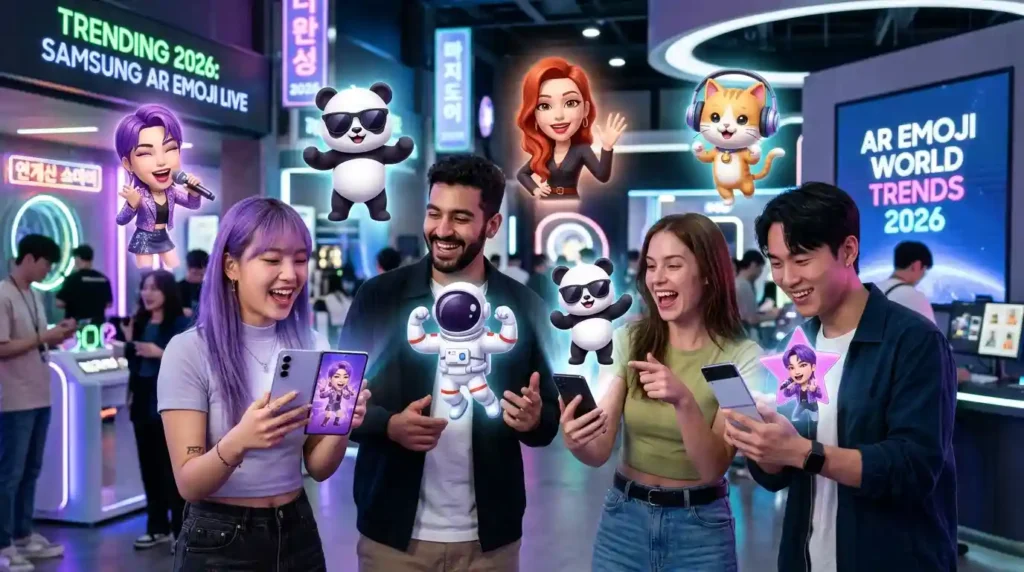
Samsung’s current naming is also worth understanding. On compatible devices running Android 15 and One UI 7.0 or later, AR Emoji features have been renamed Galaxy Avatar. Older Galaxy devices may continue to display AR Emoji and AR Zone.
Samsung dk
+1
Here are four related emoji symbols that can complement personalized avatar content in everyday online conversations.
😀 Cheerful reactions
A smiling expression suits greetings, celebrations, and casual updates. Creators may use it alongside a friendly avatar image to make a post feel approachable.
😎 Confident expressions
A confident look works well for achievement posts, profile pictures, and playful announcements. The tone can feel humorous rather than serious when the accompanying caption is lighthearted.
🥰 Affectionate reactions
Warm expressions can complement messages between friends, family members, or romantic partners. The relationship and surrounding words help clarify the intended tone.
✨ Creative accents
Sparkles can add a celebratory or decorative touch to an avatar image, story, or caption. They are especially useful when you want to highlight a small achievement or a new look.
| Emoji | Why it fits | Who might use it | Platform |
| 😀 | Cheerful, approachable reactions | Friends and creators | WhatsApp, Facebook |
| 😎 | Confident, playful updates | Social media users | Instagram, TikTok |
| 🥰 | Warm personal messages | Friends and couples | WhatsApp, Instagram |
| ✨ | Creative visual emphasis | Creators and casual users | Instagram, TikTok |
These examples describe common communication uses, not measured popularity rankings or official 2026 trend data.
The broader observation is that digital expression keeps evolving as messaging apps, camera features, and personalized stickers give people more ways to communicate beyond plain text.
13. Samsung AR Emoji Meaning in Different Contexts
The same personalized character can communicate different feelings depending on where it appears and who receives it. The avatar itself is only part of the message.
Romantic conversations
A warm avatar paired with a heart may express affection, appreciation, or romantic interest. For example, sending a smiling character with “Thinking of you ❤️” can feel personal.
However, an affectionate sticker does not automatically prove that someone has romantic feelings. Their usual communication style and your relationship matter.
Friendship
Among friends, personalized avatars often work as playful reactions. A laughing character can respond to a funny story, while a confident pose might celebrate a friend’s achievement.
For example: “You actually finished the whole project today? 😎”
The intention is usually easier to understand when the conversation already has a playful tone.
Family conversations
An avatar can make a greeting, birthday wish, or everyday update more personal. A cheerful character might accompany a family photo, while a gentle expression can support a message of encouragement.
For example: “Hope you have a lovely day 😊”
Professional and casual communication
Personalized stickers can be appropriate in relaxed team chats, depending on the workplace culture. They may be less suitable for formal customer communication, official reports, or serious discussions.
If you are unsure, use a clear written message first. A sticker should never make an important instruction harder to understand.
Texting and social media comments
In texting, an avatar may communicate a reaction that would otherwise require several words. On Instagram or TikTok, it can become part of a visual post or a short video.
For example, a surprised character might accompany an unexpected announcement. A smiling one could appear in a celebration post.
The key difference is the audience. A close friend may understand your personalized character immediately, while a new follower may need a caption to understand the joke.
Captions and profile pictures
A saved avatar image can represent your online style without requiring you to use a photograph of yourself. It can be playful, expressive, or deliberately different from your everyday appearance.
Choose the image for the message you want to communicate, and remember that different audiences may interpret the same character differently.
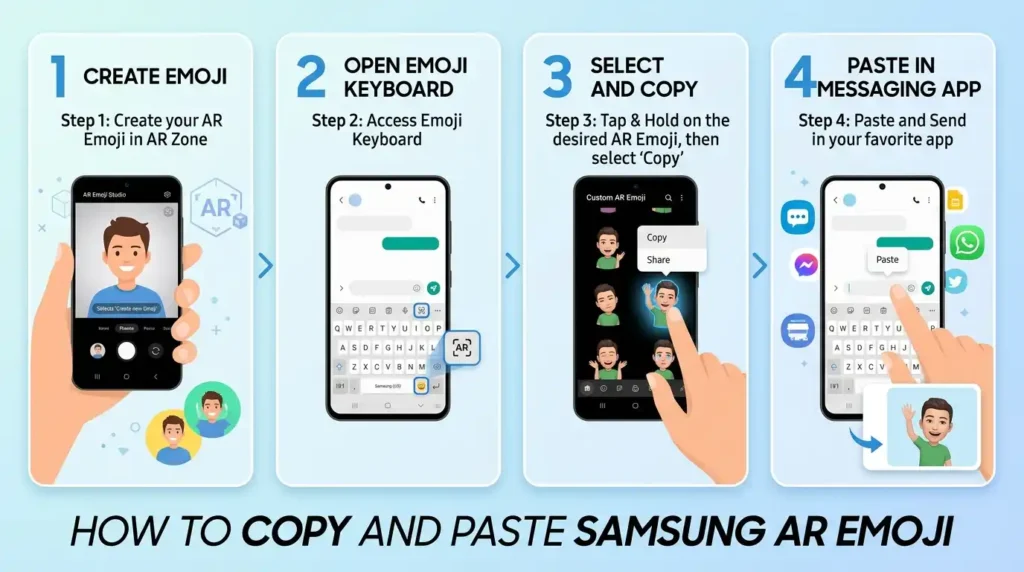
14. How to Copy and Paste Samsung AR Emoji
You can copy and share standard emoji symbols directly, but personalized Samsung avatars usually need to be shared as stickers or media rather than copied as ordinary Unicode characters.
Copy-paste emoji symbols:
Your emoji line
😀 😊 😎 😂 🥰 😢 😮 😴 ✨ ❤️ 📱 💬
Copy emoji line
To use these symbols:
- Select the emoji you want, or use the copy button above.
- Copy it to your clipboard.
- Open WhatsApp, Instagram, TikTok, Facebook, or another compatible app.
- Paste it into a message, caption, comment, or other supported text field.
- Review your message and send or publish it.
How to share your personalized avatar
On a compatible Galaxy device, open your avatar or AR Emoji tools, choose a sticker, and use the available sharing option.
On older supported devices, Samsung’s documented route is Camera, More, AR Zone, followed by AR Emoji Camera or AR Emoji Studio. On compatible newer software, look under Settings, Advanced features, Galaxy Avatar. Menu names and available options vary by device.
Samsung dk
+1
If you cannot find the feature, check your phone model and software version before assuming it has been removed. You can also look for saved avatar stickers in the Gallery or the compatible keyboard’s sticker panel.
15. Frequently Asked Questions
1. What is the most popular Samsung AR Emoji?
There is no verified universal ranking of Samsung AR Emoji characters. A smiling or cheerful avatar is a useful starting point for everyday conversations, but the best choice depends on your personality and how you want to express yourself.
2. What does Samsung AR Emoji mean when someone sends it?
It usually means the sender is sharing a personalized reaction, greeting, or playful expression. The exact intention depends on the sticker, accompanying message, and relationship between the sender and receiver.
3. Why do Samsung AR Emoji look different on iPhone and Android?
Samsung avatars are personalized digital media, while standard emojis use Unicode characters. Devices and apps may render standard emojis differently, and shared avatar images or stickers can also vary in appearance, size, and supported animation.
4. Are Samsung AR Emoji used differently in other countries?
They can be. People in different communities may use personalized avatars for humor, affection, greetings, or creative expression. However, there is no single interpretation that applies to everyone, so consider the conversation and the recipient’s communication style.
16. Conclusion
Samsung AR Emoji gives you a creative way to express your personality through personalized characters, stickers, and compatible camera features. 😊
For newer compatible devices, look for Galaxy Avatar, while older supported models may still use AR Emoji and AR Zone.
Choose expressions that fit your message, check which sharing options your apps support, and enjoy making everyday conversations a little more personal. ✨