
5. One-Line Hook
Need an emoji while typing on your Mac? One quick keyboard shortcut makes it easy.
6. Introduction
You’re writing a message, creating a social media caption, or editing a document on your Mac. Suddenly, you want to add 😊, ❤️, or 😂. Instead of searching online for an emoji, you can open Apple’s built-in character viewer directly from your keyboard.
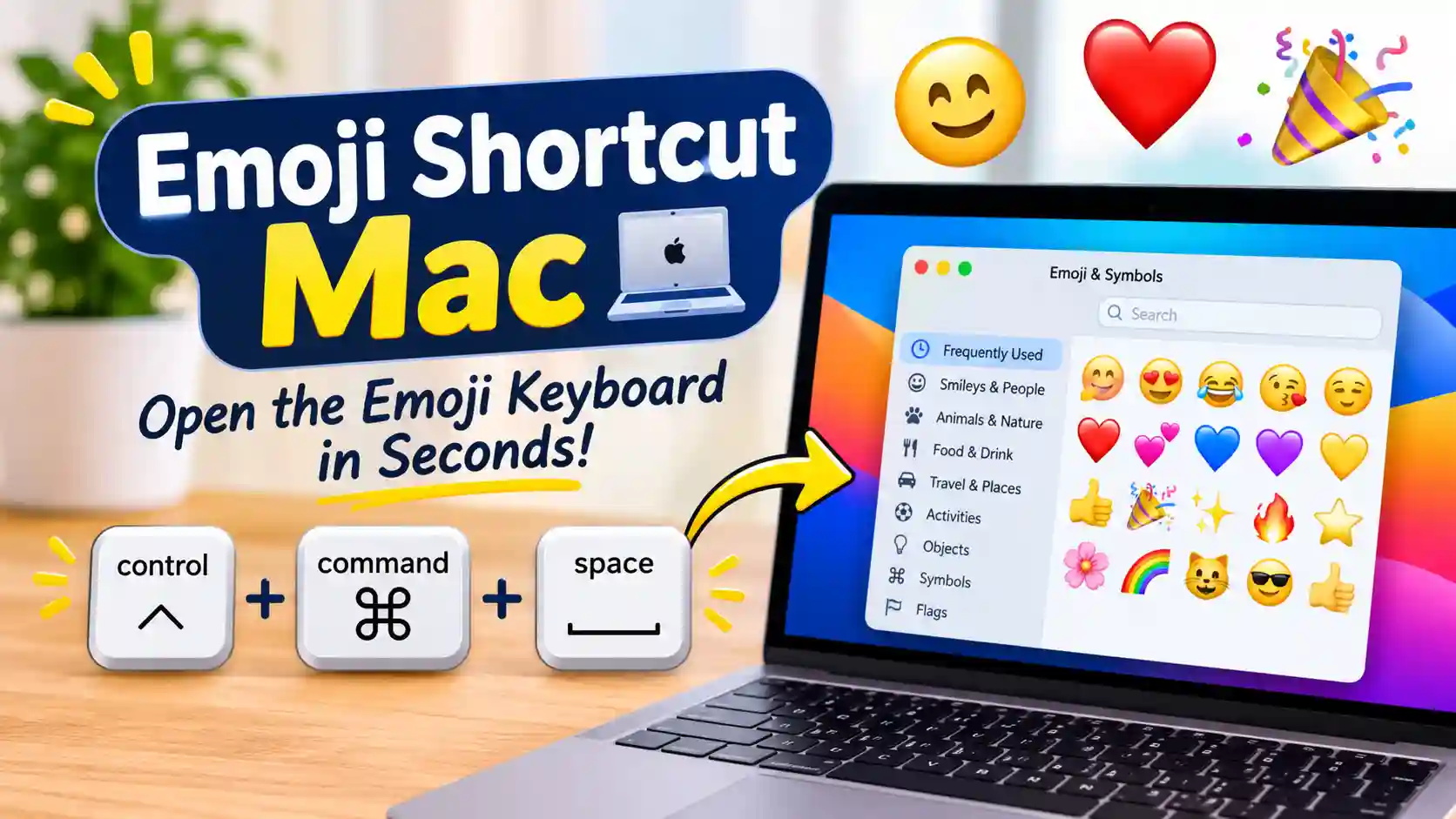
The emoji shortcut Mac users commonly need is Control + Command + Space. Press these three keys together, and the Emoji & Symbols viewer appears on supported macOS versions. You can then search for an emoji, choose a symbol, and insert it into your text.
This shortcut is useful for WhatsApp, Instagram, Messages, emails, notes, and many other writing tasks. You can also use your Mac’s Fn or Globe key, depending on your keyboard settings. Let’s look at how the shortcut works and how to use it efficiently. 😊
Three keys, one quick window, and your favorite emojis are ready to use.
8. What Does Emoji Shortcut Mac Mean?
The phrase emoji shortcut Mac refers to a keyboard command that opens the built-in Emoji & Symbols viewer on an Apple computer. It isn’t the name of a particular emoji. Instead, it describes a faster way to access hundreds of emojis without leaving your current application.
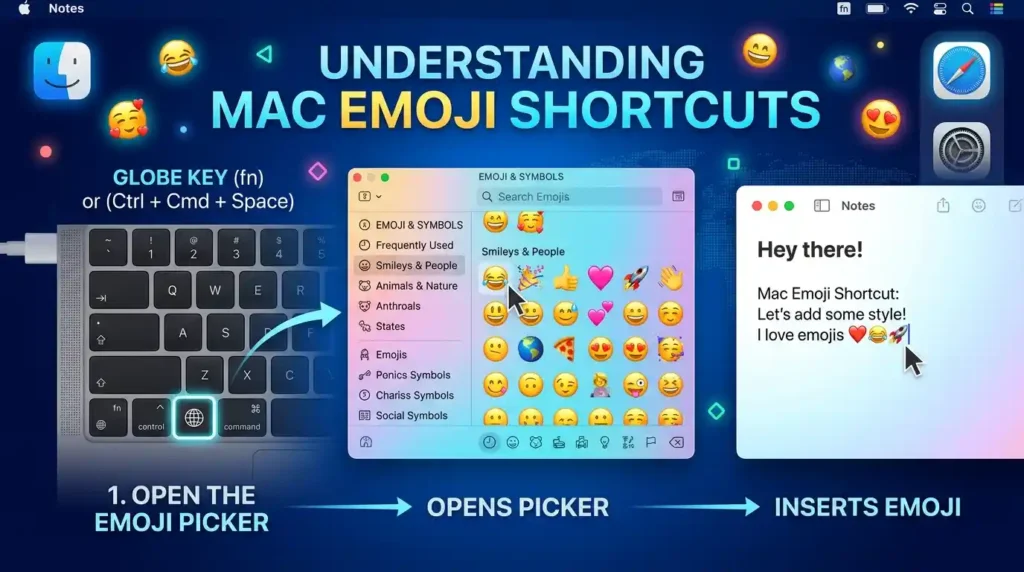
Press all three keys together while your cursor is inside a text field.
After pressing the shortcut, macOS opens the Character Viewer. This window lets you browse different emoji categories, search for specific characters, and insert symbols into your writing.
Here are six useful examples of what you can find:
- 😊 Smileys for friendly conversations.
- ❤️ Hearts for affection and appreciation.
- 😂 Laughing faces for funny messages.
- 👍 Hand gestures for quick reactions.
- 🎉 Celebration symbols for special occasions.
- 🌟 Stars for positive messages and creative captions.
These are examples of content available through the viewer, not separate keyboard shortcuts.
Why is this shortcut useful?
Imagine writing an Instagram caption about your weekend. You want to add a smiling face, but you don’t want to open another website and copy an emoji. Pressing Control + Command + Space brings up the character picker without interrupting your writing.
You can use the same feature for personal messages, school assignments, business emails, blog posts, and social media comments.
The shortcut is particularly helpful when you regularly write on your Mac. Instead of memorizing individual emoji codes, you can search by words such as “heart,” “happy,” or “fire.”
One important detail: the shortcut opens a character-selection window. It does not automatically insert an emoji. You still need to select the character you want.
Apple also documents another method using Fn or Globe + E, depending on your keyboard configuration.
Apple Support (KE)+1
Quick Emoji Reference
| Emoji | Common use | Possible misread | Best used when |
| 😊 | Happiness | Polite rather than excited | Friendly messages |
| ❤️ | Affection | Romantic interest | Expressing appreciation |
| 😂 | Laughter | Sarcasm | Funny conversations |
| 👍 | Agreement | Dismissive response | Quick confirmation |
| 🎉 | Celebration | Excessive excitement | Announcements |
| 🌟 | Positivity | Decorative emphasis | Captions and posts |
10 Useful Emojis to Try on Your Mac
😊 Smiling Face
Meaning: Happiness and friendliness.
Example 1: Thanks for your help 😊
Example 2: That sounds wonderful 😊
❤️ Red Heart
Meaning: Love, affection, and appreciation.
Example 1: Sending you lots of love ❤️
Example 2: Thank you for always supporting me ❤️
😂 Face with Tears of Joy
Meaning: Strong laughter and amusement.
Example 1: That joke was hilarious 😂
Example 2: I can’t stop laughing 😂
👍 Thumbs Up
Meaning: Approval and agreement.
Example 1: Everything looks good 👍
Example 2: See you at five 👍
🎉 Party Popper
Meaning: Celebration and excitement.
Example 1: Congratulations on your achievement 🎉
Example 2: It’s finally the weekend 🎉
🌟 Glowing Star
Meaning: Positivity and something special.
Example 1: You did an amazing job 🌟
Example 2: A little moment of happiness 🌟
🔥 Fire
Meaning: Excitement, enthusiasm, or something impressive.
Example 1: Your new design looks amazing 🔥
Example 2: That performance was incredible 🔥
💬 Speech Balloon
Meaning: Conversation and communication.
Example 1: Let’s talk about it 💬
Example 2: Leave your thoughts below 💬
✨ Sparkles
Meaning: Magic, beauty, excitement, or emphasis.
Example 1: A fresh start ✨
Example 2: Making today special ✨
🌈 Rainbow
Meaning: Color, hope, and positivity.
Example 1: Sending positive vibes 🌈
Example 2: Every day brings new possibilities 🌈
9. How to Use Emoji Shortcut Mac the Right Way
The emoji keyboard works in many applications where you can enter text. However, the exact experience can depend on the app and its text editor.
WhatsApp 💬
You can use the shortcut while writing WhatsApp messages through WhatsApp Web or the Mac desktop application.
- Open a conversation.
- Click inside the message box.
- Press Control + Command + Space.
- Search for your preferred emoji.
- Select it and send your message.
For example:
- Personal chat: Hope you’re having a lovely day 😊
- Family conversation: See you all this weekend ❤️
- Friendship: That was such a fun day 😂
- Emotional message: Thank you for being there ❤️
You can also add emojis to your WhatsApp status when using a supported editing interface.
Instagram 📸
Instagram users can add emojis to captions, comments, bios, and direct messages.
When using Instagram in a Mac browser, click the appropriate text field before opening the Character Viewer.
Examples:
- Caption: Weekend memories ✨
- Comment: Absolutely beautiful ❤️
- Reel comment: This is hilarious 😂
- Direct message: Congratulations! 🎉
The shortcut can save time when writing longer captions or responding to several comments.
TikTok 🎵
TikTok creators can use emojis to add personality to captions and comments.
For example:
- Video caption: New project, new energy 🔥
- Comment: This made my day 😂
- Friendly response: Thank you so much 😊
- Celebration: Finally achieved my goal 🎉
Some TikTok editing fields may handle keyboard shortcuts differently. If the picker does not open, try another supported text field.
Facebook supports emojis in posts, comments, and Messenger conversations.
You can use the Character Viewer to insert a friendly reaction, congratulate someone, or add personality to a post.
Examples:
- Facebook post: Celebrating another beautiful memory 🎉
- Comment: Absolutely agree 👍
- Messenger: Miss you all ❤️
Remember that the shortcut opens the Mac character picker. It does not replace the reaction buttons built into social media platforms.
10. Do’s and Don’ts of Using Mac Emojis
Do:
- Use emojis to make casual messages friendlier.
- Search by emoji names instead of scrolling endlessly.
- Consider the person receiving your message.
- Choose characters that match your intended tone.
- Check the final appearance before publishing important content.
Don’t:
- Add emojis randomly to professional documents.
- Assume everyone interprets an emoji identically.
- Overload serious messages with decorative symbols.
- Forget to position your cursor before inserting an emoji.
- Assume every website supports every emoji in the same way.
The goal is to make writing easier, not to distract readers from your message.
11. Why Do Emojis Look Different on iPhone and Android?
Have you ever sent an emoji from your Mac and noticed that it looked slightly different on someone else’s phone?
This happens because Unicode standardizes emoji characters, while technology companies create their own visual designs.
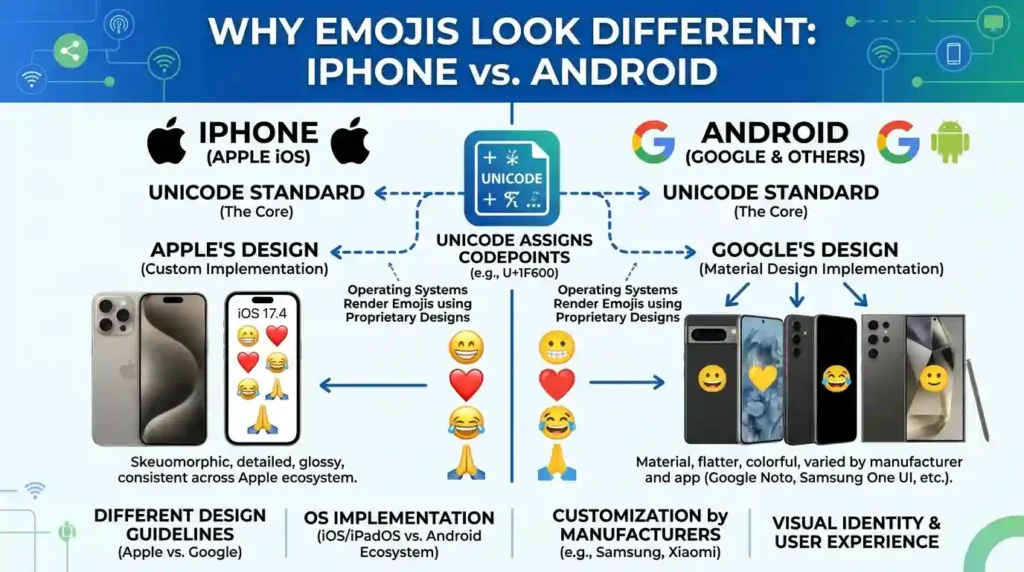
Apple, Google, Samsung, and Microsoft can display the same underlying emoji using different artwork.
For example, a smiling face may have slightly different shading, shape, or facial details depending on the device.
Here are some differences you might notice:
- Shape: Facial features and outlines can vary.
- Color: Some platforms use slightly different shades.
- Expression: Small design choices can change the appearance.
- Size: Emojis may look larger or smaller in different applications.
- Style: Some designs look more realistic, while others look simpler.
The important point is that the underlying Unicode character can remain the same even when its appearance changes.
This doesn’t mean that Apple’s version is automatically correct and Android’s version is incorrect. They are different visual interpretations of a standardized character.
Your Mac’s Character Viewer displays Apple’s emoji designs. When you send an emoji to another device, the recipient’s software generally determines how it appears.
Apple Support (KE)+1
12. Best Emoji Combinations for Mac Users: Copy & Paste
Once you know how to open the Character Viewer, you can insert individual emojis or combine them to create more expressive messages.
Here are 15 combinations you can copy and use on your Mac.
Romantic ❤️
- 👉 ❤️✨: Use this for a sweet romantic message.
- 👉 ❤️😊: Add warmth to a loving conversation.
- 👉 ❤️🌟: Share appreciation with someone special.
Cute 🥰
- 👉 😊✨: Use this for a cheerful message.
- 👉 🌈😊: Share a positive mood.
- 👉 ❤️🌈: Add a sweet touch to a friendly message.
Exciting and Fun 🎉
- 👉 🎉🔥: Celebrate an exciting achievement.
- 👉 😂✨: React to a funny and memorable moment.
- 👉 🎉🌟: Congratulate someone on their success.
Appreciation 👍
- 👉 👍❤️: Show agreement and appreciation.
- 👉 🌟😊: Compliment someone’s efforts.
- 👉 ✨❤️: Express gratitude warmly.
Everyday Messages 💬
- 👉 💬😊: Start a friendly conversation.
- 👉 🌈✨: Add positivity to a casual caption.
- 👉 🔥👍: Show approval of something impressive.
Tip: You don’t need to memorize these combinations. Keep your favorite ones in a note so you can copy them whenever needed.
13. Trending Emoji Usage in 2026
Emojis continue to play a role in everyday digital communication. People use them to express reactions, add personality to captions, and make short messages feel more conversational.
For Mac users, the Character Viewer provides a convenient way to find these characters while writing.
Here are four examples of emojis that remain useful across everyday online communication.
😊 Smiling Face
This emoji is commonly used in friendly conversations. It works well in WhatsApp messages, Instagram comments, and everyday replies.
❤️ Red Heart
The heart is frequently used to express affection, appreciation, and support. Creators also use it in captions and comments.
😂 Face with Tears of Joy
This is a familiar choice for reacting to jokes, funny videos, and entertaining posts. It can also communicate playful exaggeration.
✨ Sparkles
Sparkles are often added to aesthetic captions, announcements, and creative posts. They can make a short message feel more expressive.
Emoji Usage Across Platforms
| Emoji | Why people use it | Who uses it | Platform |
| 😊 | Friendly communication | Everyday users | |
| ❤️ | Affection and support | Friends and creators | |
| 😂 | Humor and reactions | Viewers and creators | TikTok |
| ✨ | Creative emphasis | Content creators |
These examples describe common communication uses, not verified 2026 popularity rankings.
One interesting observation is that emoji communication keeps evolving as online communities develop their own expressions and ways of using familiar symbols.
14. Emoji Shortcut Mac Meaning in Different Contexts
The keyboard shortcut itself does not have a romantic, funny, or emotional meaning. Its purpose is to open the Character Viewer. However, the emojis you select can communicate different messages depending on the situation.
Understanding context helps you choose the right characters.
Romantic Conversations
When messaging someone you care about, hearts and smiling faces can make your words feel warmer.
For example:
“Thinking about you today ❤️”
The same heart can express romantic affection or appreciation between close friends. The relationship matters.
Friendship
Friends often use emojis to make conversations more relaxed.
For example:
“That was the funniest thing ever 😂”
A laughing face can make a reaction feel playful without requiring a long explanation.
Family Conversations
Family messages often include friendly and celebratory emojis.
For example:
“Congratulations on your new job 🎉”
A celebration symbol helps communicate excitement and support.
Professional Communication
In workplace conversations, use emojis thoughtfully.
For example:
“Thanks for completing the project 👍”
A simple thumbs-up can communicate approval in a casual workplace chat. However, a formal business email may be better without emojis.
Texting and WhatsApp
Short messages sometimes need additional emotional context.
For example:
“See you tomorrow 😊”
The smiling face makes the message feel friendly rather than overly formal.
Social Media Comments
On Instagram and TikTok, emojis can communicate reactions quickly.
For example:
“Your latest video is amazing 🔥”
The fire symbol adds enthusiasm to the comment.
Captions and Posts
Creators often use emojis to complement the subject of their content.
For example:
“Little moments, beautiful memories ✨”
The words communicate the message, while the emoji adds visual emphasis.
The best approach is to consider your audience and the surrounding words rather than assuming an emoji always communicates the same thing.
15. How to Copy and Paste Emojis on Mac
You don’t always need to open the Character Viewer to use an emoji. You can also copy an emoji from an existing message, document, or website.
Copy and paste this emoji
😊 ❤️ 😂 🎉 ✨
Copy emojis
Follow these steps:
- Select the emoji you want to use.
- Press Command + C to copy it.
- Open WhatsApp, Instagram, TikTok, or another application.
- Click the text field.
- Press Command + V to paste it.
You can also copy individual emojis from websites and save frequently used combinations in your Notes app.
Another useful method: Press Control + Command + Space to open the Character Viewer, search for an emoji, and click it to insert it directly into your current text field.
Apple also lets you browse symbols, accented letters, and characters from other languages through the same viewer.
Apple Support (KE)+1
16. Frequently Asked Questions
1. What is the most popular emoji shortcut on Mac?
The most commonly used Mac emoji shortcut is Control + Command + Space. It opens the Character Viewer, where you can search for and insert emojis and other symbols.
2. What does an emoji mean when someone sends it?
An emoji’s meaning depends on the conversation, relationship, and surrounding words. A heart might express romantic affection, friendship, or appreciation. Avoid assuming someone’s intentions from an emoji alone.
3. Why do emojis look different on iPhone vs Android?
Apple and Android manufacturers use different visual designs for Unicode emoji characters. Their colors, shapes, and expressions may vary, even when the underlying character is identical.
4. Are emojis used differently in other countries?
Yes, cultural background and online communities can influence how people interpret emojis. However, meanings also vary between individuals, so consider the conversation rather than relying on assumptions.
17. Conclusion
The emoji shortcut Mac users need is Control + Command + Space. It provides quick access to emojis, symbols, and special characters.
You can also use the Fn or Globe key with E, depending on your keyboard settings.
Whether you’re writing messages, creating captions, or editing documents, these shortcuts make typing more convenient. 😊